Golf
Watch
Follow the week's PGA Tour event on your Garmin. Pick up to five players and see where each one is on the course, the hole they are playing, and every shot as it comes in, without picking up your phone. At the course, the map shows you and your players, so you know where to walk.
All features free for 14 days, with no payment to start. After that, one purchase: $4.99 for a full year from the day you buy. No subscription.
See the hole, not just the score
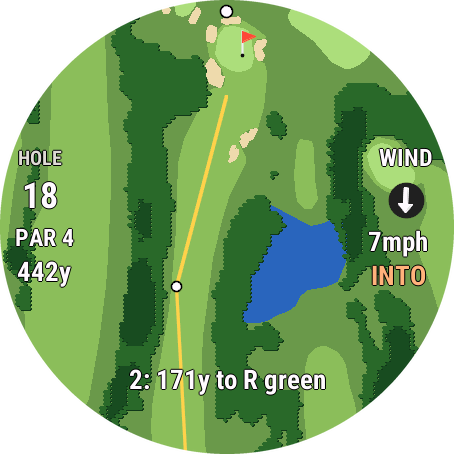
A leaderboard tells you the number. GolfWatch shows you the fairway, the bunkers and the water your player is facing, and where the ball went.
The hole, on your wrist
Each hole's shape fills the screen, with par, yards and the wind turned to the direction of play: INTO, DOWN or CROSS.
Every shot
New shots play as they come in. The ball flies in an arc, putts roll toward the cup, and each shot is described in a line of text. Open the hole a player is on and the screen follows them to the next one. Replay a hole any time with START.
Around the green
The view moves in as the ball gets close, with the pin marked. Tap to switch between the whole hole, the second shot and the green.
From the first tee to the last putt
Your players stay in your order, and the whole field is one tap away.
Your five players
Home lists your players in the order you choose, with position, score and where they are on the course. Add anyone from the Leaderboard with a long press.
18 holes around the clock
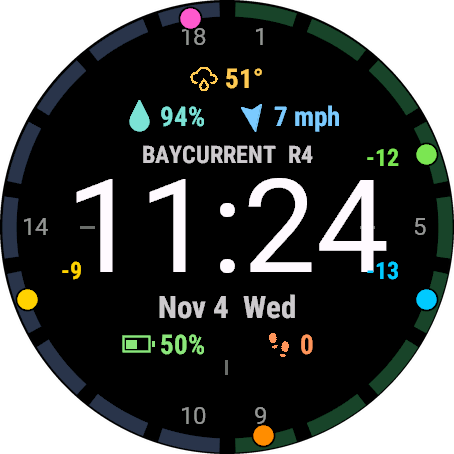
The clock screen turns the rim into the course. Your players are colored dots on the hole they are playing, with their score and shot, and the dot flashes when a new shot comes in.
Course map
Tap the time to see the whole course, with your players on it. Zoom in up to x3 with a tap. Tap a player's label for their hole and score, or hold it to open the hole they are on. At the course, turn on My position to add yourself.
Course scorecard
All 18 holes on one screen, with strokes under each, birdies circled and bogeys boxed. Tap any hole to open it. Even if your players are not in this week's event, you can look over the course before it starts.
Leaderboard and field
The whole leaderboard with flags and your players highlighted. Before the event, the field. When play is suspended, it shows when play resumes.
Season stats
Hold a player to open their season: FedEx Cup rank and points, events, cuts, top 10s, wins, scoring average and money, with driving, greens and putting stats. Go back three more seasons, and see each season's best finishes.
Shot alerts
Feel each shot of the player you have open: sound and vibration, vibration only, or off. When another of your players finishes a hole, a pop-up tells you the result.
Weather at the course
Now, hourly and daily at the course, not where you are, including wind and gusts.
Glance and watch face
A two-line glance shows one player. Put a player's position and score in a data field of your watch face; it keeps updating about every 5 minutes, even with GolfWatch closed.
Past events
Open an event that has finished and go back through your players' rounds, shot by shot.
At the event, see where you and your players are
Watching in person? Turn on My position in Settings, then tap the time on the clock to open the course map.

See yourself on the map
A blue dot marks where you are, with your players as colored dots on the same map.
How far to your player
The bottom line shows roughly how far you are from one of your players on the course.
Get there first
Player positions run about 1-2 minutes behind, so to catch a player, wait at the next hole.
Only while you look
GPS runs only while the map is on screen. Your position stays on the watch.
Free for 14 days, then one simple purchase
The 14-day trial starts by itself when you install and open the app, with no credit card. After that, a single purchase unlocks everything for a full year. No subscription, no auto-renewal, nothing to cancel.
- Follow a player: the Course and hole screens
- The course map
- Leaderboard and FIELD
- The event overview and the weather details
- Shot alerts and other players' popups while these screens are open
Even after the trial ends, the clock screen, your players on Home, Settings, the glance and your watch face stay free.
Supported Garmin devices
GolfWatch works on these Garmin watches. Use the touchscreen, or on watches with UP and DOWN buttons, the buttons.
Find your players
Enter a name, copy the ID, and paste it into Player slot 1 to 5 in the GolfWatch settings in Connect IQ. This works without the pass. Picking players from the list on the watch is for the trial and the pass.
Enter at least 2 letters, in English. Results come from ESPN, and what you type is sent to ESPN.
How to activate
Try Free
Install GolfWatch and open it. The 14-day trial starts by itself.
Find your Device ID
On the watch, tap the clock at the top of Home to open Settings. Your Device ID is listed there.
Buy the Pass
Enter your Device ID on the purchase page: 9 characters including the hyphen (xxxx-xxxx).
Enjoy
Open the app again. The pass is now active.
A key also arrives by email. You do not need to enter it if you entered your Device ID when you bought. If you do need it: Garmin Connect IQ → GolfWatch → Settings → License Key.
One payment. Nothing to cancel.
GolfWatch starts with a 14-day free trial, with no credit card. The 1-Year Pass is a one-time purchase: you are billed once, nothing renews automatically, and access runs for 365 days from the day you buy. To continue after that, buy the pass again.
As GolfWatch is a digital service activated by license key, refunds are not provided once the key has been issued. If your key does not work correctly, please contact us and we will resolve the issue promptly.
Privacy
GolfWatch does not collect personal information beyond your Garmin Device ID and email address (used for the trial, activation and billing). When you enter a license key, the watch sends it with your Device ID to check it.
The players you register are stored on your watch. Their ESPN IDs are sent to our server to fetch their scores. If you turn on My position, your location is used only on the watch and is not sent anywhere.
Course maps are simplified drawings of our own and are for following the event. A map marked Being confirmed is still being checked. GolfWatch is an independent app, not affiliated with or endorsed by the PGA TOUR, ESPN or Garmin.
Payment processing is handled by Stripe. Support: