Market
Watch
Auto-refreshing stock prices, crypto, FX and indices — directly on your Garmin watch. Designed for serious investors who need market data at a glance.
All features free for 14 days — no payment to start. $7.99 one-time after trial, no subscription.
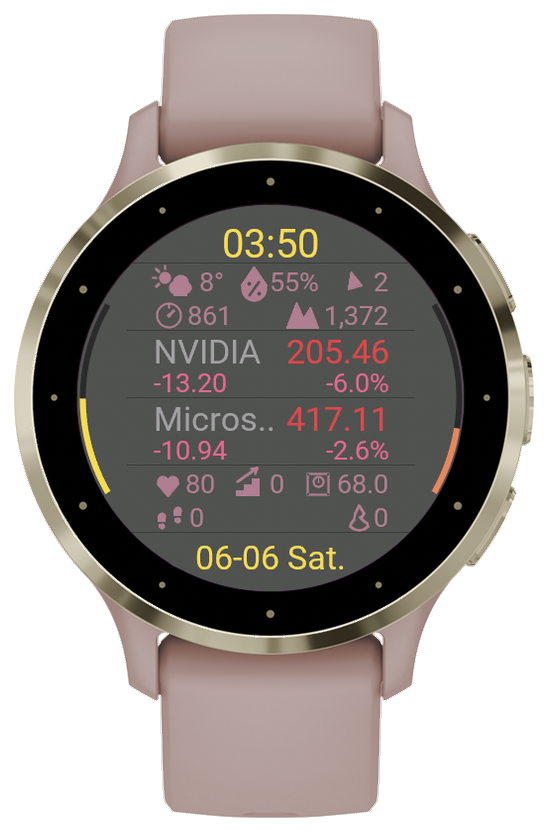
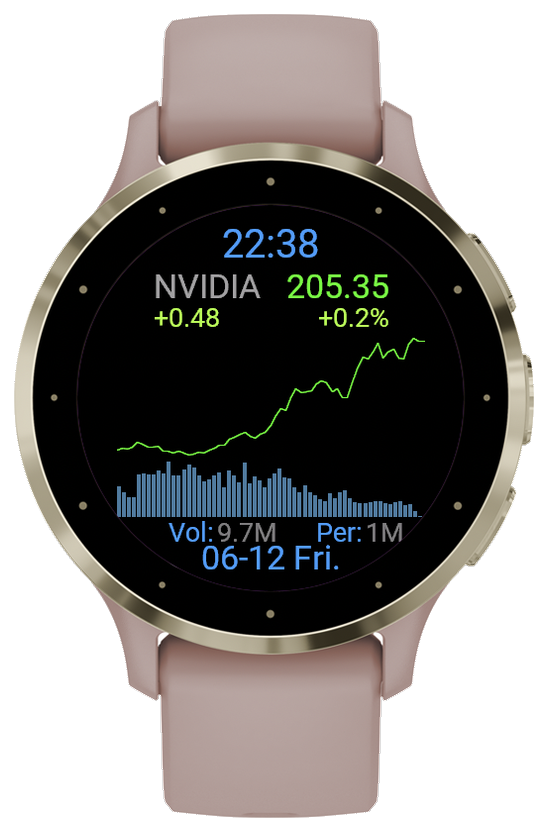
Opens to a watch face — tap in for your markets
MarketWatch opens to a Watch Face Home: an analog or digital clock with your own image and up to five live info rows — your portfolio total, a stock, the Weather Bar or the Physical Bar. Tap to dive into the full markets list, and press BACK to return to the face.
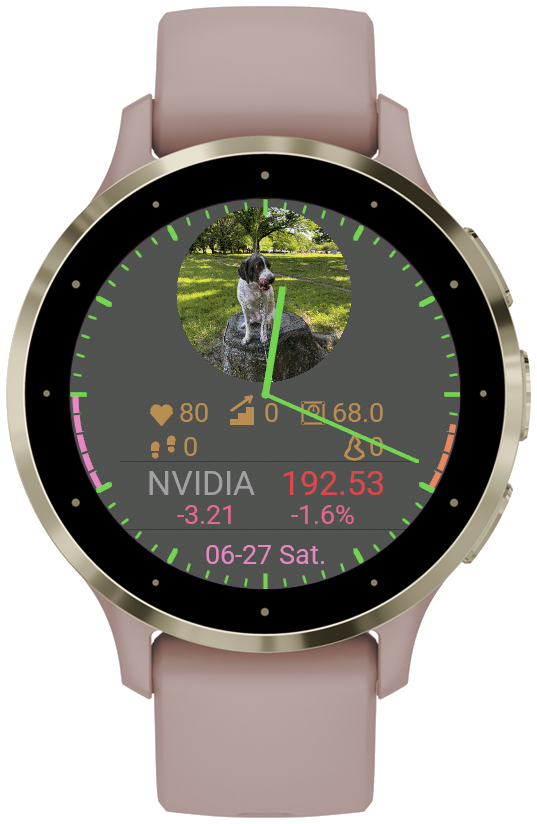
- Three clock styles — analog Hands, Rim marks, or Digital
- Your own image on the face — uploaded and shown as a circular image
- Up to 5 live info rows — portfolio total, a stock, Weather Bar, Physical Bar
- Tap into the markets list; long-press a row to open its detail
- Left & right rim meters — Body Battery, Stress or Battery
- Stock complications on your watch's own face — they keep updating about every 5 minutes, even with MarketWatch closed
Everything you need on your wrist
MarketWatch brings auto-refreshing market data to your Garmin with a clean, high-visibility display.
Watch Face Home
The app opens to a customizable watch face — analog Hands, Rim marks, or Digital clock, with optional Clock Ticks and your choice of hand, clock and background colors. Place up to 5 info rows (portfolio, a stock, Weather or Physical Bar), then tap to enter the markets list.
Custom Watch Face Image
Upload your own image from the web and it appears as a circular image on your watch face. Just enter your Device ID — no account needed. Available during the free trial and after purchase.
Auto-Refreshing Prices
Auto-refreshing quotes for stocks, crypto, FX & indices. Configurable 30sec–30min intervals.
※ Data from Yahoo Finance. May be delayed up to 15 min.
Multi-Period Charts
Switch between 6 periods — 5-minute (today), 30-minute (1 week), 90-minute (1 month), daily (3mo), weekly (1y) and monthly (5y) — with high/low, date range, and a volume bar graph.
Price-Cross Alerts
Set up to 2 price-cross alerts per symbol. Get notified with vibration and sound when current price crosses your target.
Position Memo
Track cost basis, holdings, evaluation amount, and P&L (amount + %) per symbol. Open the memo in the detail screen, then long-press a field to edit it on the watch.
WebMemo
A free web workspace for MarketWatch owners. Build and organize your portfolio on a full-size screen, then pull it to the watch from its menu — no typing tickers on a tiny display. Edits you make on the watch can be sent back the same way.
How it connects →20 Custom Symbols
Fully configurable via the Connect IQ app. Mix stocks, crypto, FX, and indices freely.
Weather Bar
An optional on-watch bar showing temperature, humidity, wind speed & direction, air pressure and altitude — from Garmin weather and on-device sensors.
Physical Bar
An optional bar with live body stats right on the list screen: heart rate, floors climbed, weight, steps and calories.
Left & Right Rim Meters
Curved gauges on the left and right edge of the screen. Assign Body Battery, Stress, or device Battery to each side independently.
Tap a Bar for Details
Tap the Weather or Physical bar to open full screens: current weather, hourly and daily forecast, altitude and barometer; heart rate, Body Battery, stress, steps and floors.
Battery Saver
After a few seconds without input the screen dims to just the clock, saving power. Raise your wrist or tap to return to exactly where you were.
Push Notifications
Optional Pushover integration — receive earnings and dividend alerts as push notifications on your phone.
Any market, any symbol — worldwide
All 20 symbol slots are fully customizable. Stocks from 30+ exchanges, plus FX, crypto, indices, commodities, and bond yields — all via Yahoo Finance.
Global stock exchanges (30+)
Append the exchange suffix to the local ticker code. Search any company name on finance.yahoo.com to get the correct ticker.
| Region | Suffix | Example |
|---|---|---|
| Americas | ||
| USA | (none) | AAPL, MSFT, NVDA, GOOGL |
| Canada (TSX) | .TO | RY.TO (Royal Bank) |
| Brazil | .SA | PETR4.SA (Petrobras) |
| Mexico | .MX | WALMEX.MX |
| Asia | ||
| Japan (Tokyo) | .T | 7203.T (Toyota) |
| Hong Kong | .HK | 0700.HK (Tencent) |
| China (Shanghai) | .SS | 600519.SS (Kweichow Moutai) |
| China (Shenzhen) | .SZ | 000001.SZ (Ping An Bank) |
| Korea (KOSPI) | .KS | 005930.KS (Samsung) |
| Korea (KOSDAQ) | .KQ | — |
| Taiwan | .TW | 2330.TW (TSMC) |
| India (NSE) | .NS | RELIANCE.NS |
| India (BSE) | .BO | — |
| Singapore | .SI | D05.SI (DBS) |
| Indonesia | .JK | — |
| Thailand | .BK | — |
| Malaysia | .KL | — |
| Philippines | .PS | — |
| Oceania | ||
| Australia (ASX) | .AX | BHP.AX (BHP) |
| New Zealand | .NZ | — |
| Europe | ||
| UK (London) | .L | HSBA.L (HSBC) |
| Germany (XETRA) | .DE | SAP.DE (SAP) |
| France (Paris) | .PA | BNP.PA (BNP Paribas) |
| Netherlands | .AS | ASML.AS (ASML) |
| Switzerland | .SW | NESN.SW (Nestlé) |
| Italy (Milan) | .MI | — |
| Spain (Madrid) | .MC | — |
| Sweden (Stockholm) | .ST | — |
| Norway (Oslo) | .OL | — |
| Denmark | .CO | — |
| Poland (Warsaw) | .WA | PKO.WA (PKO Bank Polski) |
| Middle East / Africa | ||
| Israel (Tel Aviv) | .TA | — |
| Saudi Arabia | .SR | — |
| South Africa | .JO | — |
Coverage: developed markets + ASEAN + most BRICS. Symbols supported include not just stocks but FX, indices, commodity futures, ETFs, and US Treasury yields — see the categories above.
Find your Yahoo Finance ticker
Search by company name to find the exact Yahoo Finance ticker (with the correct exchange suffix). Then enter it on the watch: long-press a symbol in the list and choose Edit Ticker.
Enter at least 2 characters. Results from Yahoo Finance public search.
Free for 14 days, then one simple price
- Up to 20 symbols (worldwide markets)
- Multi-period charts — 5min to monthly (all symbols)
- Price-cross alerts (2 per symbol, vibrate + sound)
- Position memo (cost / qty / value / P&L)
- Weather & Physical info bars
- Left & right rim meters (Body Battery / Stress / Battery)
- Push notifications (earnings & dividends)
- 6 background colors + Red Up / Green Up modes
- On-watch ticker register / edit / delete
- 2 watchface complications
- Lifetime license — no subscription
Supported Garmin devices
Compatible with all Garmin AMOLED display devices. Supports 360px, 390px, 415px, 454px resolutions and Venu X1.
How to activate
Your license key is generated from your watch's Device ID (format XXXX-XXXX), so the ID you enter at checkout must exactly match your watch. A wrong or completely different number means the key will not activate.
Where to find it: open MarketWatch. If the Watch Face home is off, tap the date area at the bottom of the list to open the Menu and set Watchface to On. Then, on the Watch Face screen, long-press an empty area to open the Watch Face menu, scroll to Device ID, and enter it exactly.
Try Free
Install MarketWatch from the Connect IQ Store and start your 14-day full-feature trial — no credit card required.
Purchase
To keep full features after the trial, pay once via Stripe ($7.99). At checkout, enter your email and your watch's Device ID (see the note above). An activation key is emailed to you.
Enter Key
Garmin Connect IQ → MarketWatch → Settings → enter the key in License Key field.
Enjoy
Save settings and restart the app. Full version is now active.
Refund & Cancellation Policy
Refund Policy: As MarketWatch is a digital product (license key), all sales are final. If your license key does not function correctly, please contact us at and we will resolve the issue promptly.
Cancellation Policy: MarketWatch is a one-time purchase with a lifetime license — there is no subscription or recurring charge. No cancellation is required.
For any questions:
Powered by Stripe
All payments are processed by Stripe — the same payment infrastructure trusted by the world's largest companies.
Card data never touches our servers
Your card details are entered directly on Stripe's secure checkout. Easymoat never sees, stores, or transmits your card information.
Trusted at scale
Stripe powers payments for 62% of Fortune 500 companies, and 80% of the largest US software companies — including Amazon, Google, and Microsoft.
Fraud protection by Stripe Radar
Stripe Radar — Stripe's machine learning fraud detection — blocked $2.3 billion in fraudulent transactions in 2025 alone.
One-time purchase, lifetime use
Pay once via Stripe checkout — no subscription, no recurring charges. Your activation key is delivered by email and works forever.
Privacy Policy
MarketWatch does not collect your email address, name or any other personal information. Your settings (ticker symbols, names, memos) are stored locally on your device via the Garmin Connect IQ platform. License verification sends only your license key and the watch's Device ID to our server.
Stock price data is fetched from Yahoo Finance and Binance public APIs. No user data is sent beyond the ticker symbols you configure.
If you choose to use the optional companion services (WebMemo, MarketWatch Max sync, or the watch face image), the data you enter there is stored on our server, keyed to your Device ID. On an updated MarketWatch, these services confirm that you have the watch with the Web code shown in its Device ID menu, and a MarketWatch Max is linked only when you approve it in WebMemo. Details are in the WebMemo Privacy Policy.
Payment processing is handled by Stripe. Support: